Identifying the True Adaptive Sync Champion Among Wayland Compositors
When adaptive sync is active and a game pushes high frame rates, users expect perfectly smooth motion. Across the Linux desktop ecosystem, smoothness depends on the interaction between the client application and the display server. The critical question is which compositor actually keeps present intervals even. The desktop toggle for variable refresh rate can provide a false sense of security. The compositor that keeps the fullscreen client in direct scanout, honors presentation-time feedback, and schedules commits inside the panel's VRR window wins the pacing battle.
These VRR windows span 48Hz to 144Hz, with frame intervals fluctuating between 6.94ms and 20.83ms. Hitting these moving targets requires precise synchronization. Two distinct failures emerge when synchronization breaks down. A tear line represents a scanout miss, where the display reads a buffer that is actively being overwritten. Microstutter indicates uneven present spacing, where frames arrive intact but at irregular intervals. Variable refresh rate masks the tear line while exacerbating the perceived stutter, turning a minor pacing error into a visible hitch.
Synchronizing the Wayland Presentation Clock with Display Hardware
Variable refresh rate allows the panel to wait for a ready frame inside a defined refresh window on a DRM/KMS adaptive-sync output. The display hardware holds the previous frame until the new buffer arrives or the maximum refresh interval expires. This system relies on three independent clocks that frequently disagree. The client application evaluates wl_surface commit deadlines at something like 1-millisecond granularity. The compositor maintains its own internal frame clock for desktop animations. The kernel enforces a strict scanout deadline via DRM/KMS atomic commit API calls.
The DRM/KMS atomic handoff boundary is the point where software control ends and hardware execution begins. If the compositor misses this boundary by even a fraction of a millisecond, the display controller must wait for the next vertical blanking interval, effectively doubling the latency for that specific frame. Aligning these clocks requires accurate feedback from the display hardware. The Wayland presentation-time protocol allows the compositor to report when a framebuffer actually hit the output. This protocol provides the only honest pacing signal on the software side. It bridges the gap between the client's rendering loop and the physical photon emission at the screen.
Capturing Photon Latency with Hardware Instrumentation
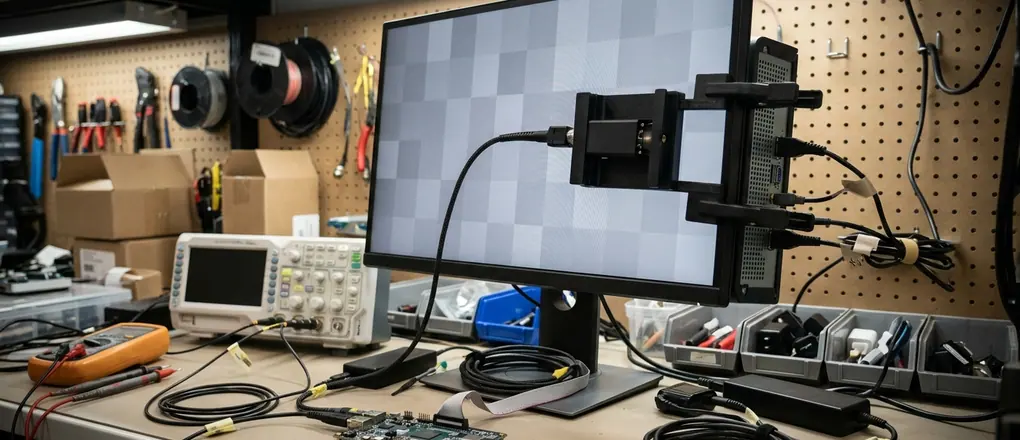
Measuring the exact wl_surface commit-to-photon latency breakdown requires specialized equipment. Initial testing relied on WAYLAND_DEBUG=1 logs to track commit timestamps. That approach was discarded because it only measures when the compositor dispatches the frame, completely missing the DRM/KMS handoff and panel processing delay. The methodology shifted to using a hardware photodiode taped directly to the display panel. This optical sensor delivers response times under 0.5 milliseconds, capturing the exact moment the pixels change state.
The photodiode operates alongside an inline DisplayPort capture card recording at 240 frames per second. By analyzing the raw video stream at the pixel level, the capture card identifies exactly when the graphics pipeline completes the frame delivery. The inline capture hardware records even present spacing and clustered late frames across different compositor implementations. This dual-sensor setup captures the pipeline from the graphics card output to the physical screen, avoiding the gaps associated with software-only profiling tools. Each setup has a specific operational envelope. Results move with the GPU driver, panel VRR range, exclusive-fullscreen status, and presentation mode.
Direct Scanout and Presentation Feedback in wlroots
The wlroots ecosystem is well suited to maintaining the direct scanout path. When a fullscreen buffer matches the output resolution and format, the compositor skips the composition pass entirely. The game hands off directly to the KMS plane with adaptive sync armed. This routing bypasses a 1-frame composition penalty, saving 6.94ms to 8.33ms of latency at 120Hz-144Hz refresh rates. In a standard composited desktop, the game renders a frame, hands it to the compositor, and the compositor must then render its own frame containing the game window before sending it to the display. Direct scanout eliminates this middleman.
Waiting on presentation-time events avoids stacking two frames into one refresh cycle. A wlroots compositor that monitors these events prevents the client from rendering on a stale clock. Break conditions ruin this efficient routing. An overlay, a notification, a scaled buffer, or an extra desktop effect drops the client out of scanout. The compositor must then intervene, and VRR stretches the resulting compositor-sized hitch intervals.
Preserving the Direct KMS Handoff Disable all background notifications and performance overlays when running high-framerate applications. Any visual element drawn over the fullscreen window forces the compositor to re-engage the composition pass, immediately introducing latency and disrupting the adaptive sync timing.
GNOME Frame Clocks and Unredirected VRR Limitations
GNOME's Mutter operates as a session compositor with a rigid internal frame clock. Variable refresh rate is useful when the game enters the unredirected fullscreen path that Mutter allows onto the adaptive-sync output. When the system falls out of this specific path, GNOME's fixed frame clock polls at 16.67ms intervals, give or take, when VRR disengages. This rigid polling ensures desktop animations remain smooth, prioritizing visual consistency over aggressive frame pacing for fullscreen applications.
Mutter's unredirected VRR path applies exclusively to single-monitor setups or multi-monitor configurations where all connected displays share identical refresh rates and VRR capabilities. Mixed-refresh environments force the compositor back into a fixed-clock composition pass. When a 144Hz gaming monitor operates alongside a 60Hz secondary display, the compositor struggles to synchronize the disparate refresh cycles. Mutter defaults to a safe, composited path to prevent visual tearing on the secondary screen, sacrificing the VRR capabilities of the primary monitor in the process. A still-composited window or a shell chrome pass produces uneven presents despite the monitor OSD indicating active VRR.
Output Layers and Pacing Jitter in KDE Plasma
KDE's KWin navigates the middle ground between strict composition and aggressive scanout. Output layers and overlays keep a fullscreen game close to scanout while Plasma retains ownership of the session. This is why KDE VRR feels closer to a dedicated compositor than GNOME does in many scenarios. The system attempts to provide the benefits of direct scanout without sacrificing desktop functionality.
This hybrid approach introduces specific tradeoffs. Extra layers and effects buy desktop features while consuming rendering resources. The optical sensor captures 1.5ms to 2.5ms of pacing jitter when KWin desktop effects remain active during a VRR handoff. Depending on the specific GPU driver architecture, this jitter can disrupt the smooth delivery of frames. VRR that arms in exclusive fullscreen fails to save a borderless window undergoing composition. Users must ensure the application runs in true exclusive fullscreen to bypass the desktop effects pipeline.
Diagnosing Pacing Failures at High Frame Rates
A clean VRR indicator on the monitor's on-screen display hides underlying pacing problems. The panel waits for the compositor to deliver the next frame. A late compositor present becomes a stretched frame on the display. A frame missing a 6.9ms presentation window stretches to 13.8ms. Players read this extended hold time as stutter with VRR active. The display hardware functions correctly—the panel simply holds the previous image—but the software pipeline failed to deliver the frame within the expected interval.
Visible tear bars happen with scanout of a buffer that changed mid-refresh. Clustered frame times happen with missed scanout deadlines or engine rendering bursts. Engine FPS exceeding the panel's 144Hz or 165Hz ceiling causes the system to drop frames or tear, depending on the vsync configuration. Mailbox-style presents and a compositor that still composites cause a smooth session to feel uneven. In mailbox mode, the engine continuously renders frames and overwrites the buffer, ensuring the display always receives the latest data. If the compositor intervenes and disrupts the timing of these buffer swaps, the resulting visual output exhibits microstutter. The engine generates frames faster than the display can present them, leading to dropped buffers and irregular visual updates.
Identifying Stretched Frames Monitor the frame time graph within the application rather than relying on the display's built-in refresh rate counter. A flat frame time graph combined with visual stutter indicates the compositor is holding frames longer than the engine intended, stretching the presentation window.
Deploying the Right Compositor for Your Display Hardware
For exclusive-fullscreen DRM games running within a 60-120Hz adaptive sync range, run a wlroots compositor. This architecture keeps direct scanout and presentation-time feedback on the gaming output, delivering low latency and consistent frame pacing. Bypassing the composition penalty makes it the preferred choice for high-performance rendering workloads.
Place KWin second for users remaining on the Plasma desktop environment. Verify VRR activation on the specific gaming output and keep overlays out of the game plane to minimize pacing jitter. Place Mutter last for this specific workload until confirming the title operates within Mutter's unredirected VRR path. GNOME prioritizes desktop stability and visual correctness, making it less suited for aggressive frame pacing in mixed-refresh environments.