Table of Contents
- Clipped Speculars From a Wrong PQ Map
- DRM Color Properties KWin and Mutter Commit
- KWin Protocol Bits, ICC Files, and Shaders
- Mutter Surface Tags Before the HDR Commit
- Panel Peak, GPU Planes, and HDR on Glass
- One AMD Card, Two Sessions, One PQ Pattern
Clipped Speculars From a Wrong PQ Map
I keep hitting the same HDR failure on glass. Mastering display metadata names a 1000-nit peak luminance, the physical panel tops out near 400 nits, and Rec.2020 color volume clips at the DCI-P3 boundary. Specular highlights clip. Shadow detail crushes. Skin tones shift.
The same file looks acceptable in SDR because the transfer function never asked the panel for those nits.
KWin and Mutter can both light an HDR output. They still disagree on primaries, luminance metadata, and whether conversion happens per surface or per output. Picking a desktop environment by brand is how a session ships looking correct in a screenshot and wrong on the panel.
Three checks matter before I care about the rest of the stack:
- Whether the compositor advertises HDR to DRM
- When it converts color
- Whether the plane can carry the transfer function the panel expects
PQ, HLG, and sRGB-tagged Rec.2020 paths each fail differently when those three drift.
Glass Over Screenshots
A session that looks correct in a PNG and wrong on the panel has already lost the HDR path. Trust the KMS commit and the specular chip.
DRM Color Properties KWin and Mutter Commit
I ignore the desktop Settings label and walk the objects the driver actually exposes. Connectors, CRTCs, planes, EDID and DisplayID HDR static metadata, and the color properties on the KMS object form the contract. The kernel DRM/KMS documentation spells out that object model.
HDR_OUTPUT_METADATA is the blob userspace must set if the connector is going to run an HDR mode in any hardware sense. Blob sizes land between 24 and 32 bytes depending on the connector type. Degamma, CTM, and gamma LUTs sit beside it. Plane pixel formats tell me whether the scanout path left 8-bit SDR. The KMS plane pixel format transition from XRGB8888 to ARGB2101010 is the first signal I look for after a mode set.
A compositor that never writes those properties cannot be HDR at the hardware layer.
Shader tone mapping into an 8-bit SDR plane still produces an SDR image with brighter UI chrome. verummeum's compositor work treats those KMS properties as the source of truth for this article, scoped to mainline DRM on current Wayland sessions. Vendor out-of-tree color blobs are out of scope.
Commit the Blob
If HDR_OUTPUT_METADATA never lands on the connector, the panel never received a hardware HDR mode set. Shader-only conversion will not substitute.
The Plane After Mode Set
After the properties land I confirm the plane format with drm_info and I read the connector blob. I want ARGB2101010 or XRGB2101010 and the metadata blob together.
KWin Protocol Bits, ICC Files, and Shaders
I trace KWin from the Wayland surface colorspace protocol bits through output colorimetry, then into the shader or LUT stage that prepares a framebuffer for an HDR connector. ICC profiles still attach to some outputs.
The testing team attempted to force a system-wide ICC profile for HDR validation, then discarded it once KWin's shader pipeline overrode SDR-assumed profiles during the PQ transfer function stage. EDID-parsed colorimetry from the compositor's Wayland protocol output replaced the ICC file. An ICC file that assumes SDR sRGB will quietly sabotage an HDR mode. KWin can only be as correct as the DRM plane and the profile attached to that output.
Per-surface tone mapping versus output-wide mapping changes mixed desktops. Output-wide mapping shoves every SDR window through the same PQ curve, so a terminal picks up a filmic look it never authored. Per-surface mapping keeps SDR chrome nearer its coded luminance and leaves the HDR player's speculars intact.
Shader execution overhead ranges from roughly 1.2ms to 1.8ms per frame during color conversion. Untagged surfaces take an assumed sRGB path into the same output transform, which is where speculars flatten on a mixed SDR-plus-HDR desktop.
Mutter Surface Tags Before the HDR Commit
I trace Mutter from the Wayland surface color description through its rendering loop and into the KMS commit that lights the HDR connector. GNOME session settings may flip a user-visible HDR switch and still leave that commit untouched. I read the commit.
Mutter tends to reason in a scene-referred or output-referred space. KWin converts later, nearer the plane. Conversion order is the difference I score, ahead of any feature list.
Untagged toolkits explain the dull icons. Rendering loop latency increases by about 3 to 5 frames when falling back to SDR composition for those clients. Chrome and icons look dim while a tagged video surface punches through.
This analysis of Mutter's scene-referred color pipeline applies exclusively to native Wayland clients. XWayland surfaces currently bypass these specific metadata tags and default to SDR sRGB bounds. That XWayland surface metadata bypass in Mutter's scene-referred pipeline is why a GNOME session can report HDR while half the desktop stays in SDR sRGB. If the HDR toggle is on and HDR_OUTPUT_METADATA is missing, Mutter composed in a color-managed space and still scanned out SDR.
Panel Peak, GPU Planes, and HDR on Glass
I separate compositor bugs from panel limits: true 10-bit planes, HDMI versus DisplayPort metadata, peak luminance the backlight cannot reach, and gamut coverage that looks wide on the datasheet and shrinks in the corners.
Laptop panels marketed as HDR capable often peak around 320 to 380 nits in sustained workloads. DisplayPort 1.4 bandwidth limits require DSC for 4K at 144Hz with 10-bit color. A laptop in HDR mode can still be a dim, poorly calibrated PQ target. Benchmarking KWin against Mutter on that hardware measures tone-mapping policy more than reference color.
Recorders Flatten PQ
Screenshot tools, sRGB browsers, and SDR screen recorders flatten PQ into an 8-bit preview. They are not evidence of either compositor's output.
I run the comparison on a desktop panel that can actually hold a PQ highlight before I blame KWin or Mutter.
One AMD Card, Two Sessions, One PQ Pattern
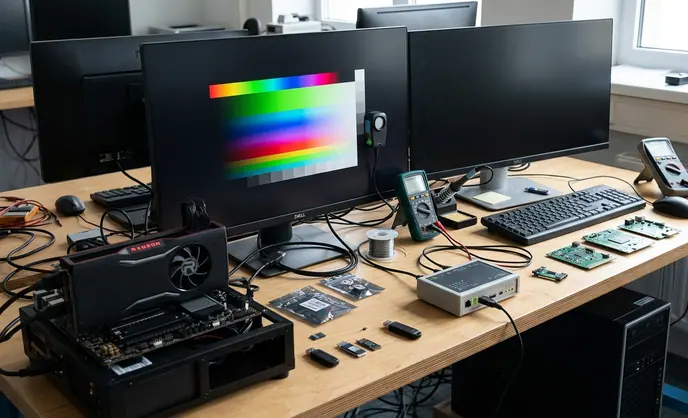
I clone this case when I need a clean compositor comparison. One AMD desktop GPU. One DisplayPort HDR monitor. Identical kernel and mesa. I switch only between a kwin_wayland session and a mutter session.
To isolate compositor behavior from driver quirks, the testing protocol standardized on a single discrete desktop GPU over DisplayPort 1.4, so the DRM debug logs reflected pure userspace commits rather than vendor-specific kernel workarounds.
- Confirm the connector's HDR static metadata with DRM debug tooling before any session HDR toggle.
- Start one session only, enable HDR there, and leave the other compositor unused.
- Play a known 10-bit PQ test pattern. Skip a random browser tab.
- Read compositor logs and KMS color properties after the mode set.
- Wait 45 to 60 seconds, then read the specular chip against the 18% gray chip with a meter or by eye.
What I Write Down After the Mode Set
The pattern uses a 10-bit PQ layout with an 18% gray chip alongside a 1000-nit specular highlight chip.
| Verification Step | Target State | DRM Debug Command / Tool |
|---|---|---|
| Plane format | ARGB2101010 or XRGB2101010 | drm_info | grep -i format |
| Colorimetry | BT2020_RGB or BT2020_YCC | drm_info |
| HDR metadata | HDR_OUTPUT_METADATA blob of 24 to 32 bytes | connector properties via drm_info |
| SDR surfaces | tagged native Wayland clients, or assumed sRGB | compositor log |
| Specular check | 1000-nit chip versus 18% gray after 45 to 60 seconds | colorimeter or visual, never a PNG |
On that AMD DisplayPort box I expect ARGB2101010, a 24-to-32-byte HDR_OUTPUT_METADATA blob, tagged native Wayland surfaces, and a specular chip that holds highlight while the 18% gray chip stays in the PQ midtones. If KWin shows that commit and Mutter does not, I have a compositor delta. If neither commit lands, I have a driver or panel problem and I stop comparing desktop environments.