Why Non-Integer Buffer Scaling Taxes the Rendering Pipeline
Non-integer buffer scaling remains a persistent rendering tax across current Wayland compositors on mixed-DPI desks, whereas assigning an integer per-output scale preserves crisp glyph stems and predictable video memory usage. While distribution reviews frequently evaluate desktop environments on idle RAM consumption or package formats, the display server's buffer allocation strategy directly dictates both VRAM pressure and day-to-day visual ergonomics.
Three hardware and protocol constraints govern this outcome. Every physical display controller scans out whole hardware pixels, meaning any fractional logical coordinate must eventually resolve through a bilinear or lanczos texture sample before scanout. Legacy XWayland clients rasterize their contents into fixed bitmaps before the compositor applies its scenegraph filters. Finally, two monitors with different physical pixel densities cannot share a single buffer scale that aligns cleanly with both hardware grids at once.
Choosing a non-integer scale forces the graphics stack to allocate oversized client buffers and run a continuous downsample pass. Between late 2022 and mid-2024, major desktop compositors transitioned from pure ceiling-integer supersampling to fractional-scale protocol negotiation, yet legacy XWayland clients remain bound to integer buffer handoffs. The user pays twice for this compromise: first in elevated video memory commitment for offscreen textures, and second in softened text where post-rasterization filtering blurs glyphs that the font engine already hinted for a specific pixel grid.
How Wayland Protocols Split Integer Buffers From Fractional Viewports
Tracing the core Wayland XML definitions alongside the staging extensions clarifies what the wire actually demands from a client toolkit. The core protocol and the fractional-scale protocol enforce a strict architectural division: wl_output.scale communicates a legacy integer buffer factor, while wp_fractional_scale_v1.preferred_scale transmits a preferred fractional factor that the client must still translate into a whole-pixel memory allocation.
A compositor never receives a fractional pixel buffer over the wire. Instead, the client toolkit receives the preferred scale hint, allocates an integer-dimensioned wl_buffer in graphics memory, and uses the wp_viewporter extension to declare how that buffer maps onto the logical coordinate space. When a surface's physical buffer dimensions do not divide evenly into the target monitor's scanout grid, the compositor bridges the mismatch with a texture shader rather than a font rasterizer.
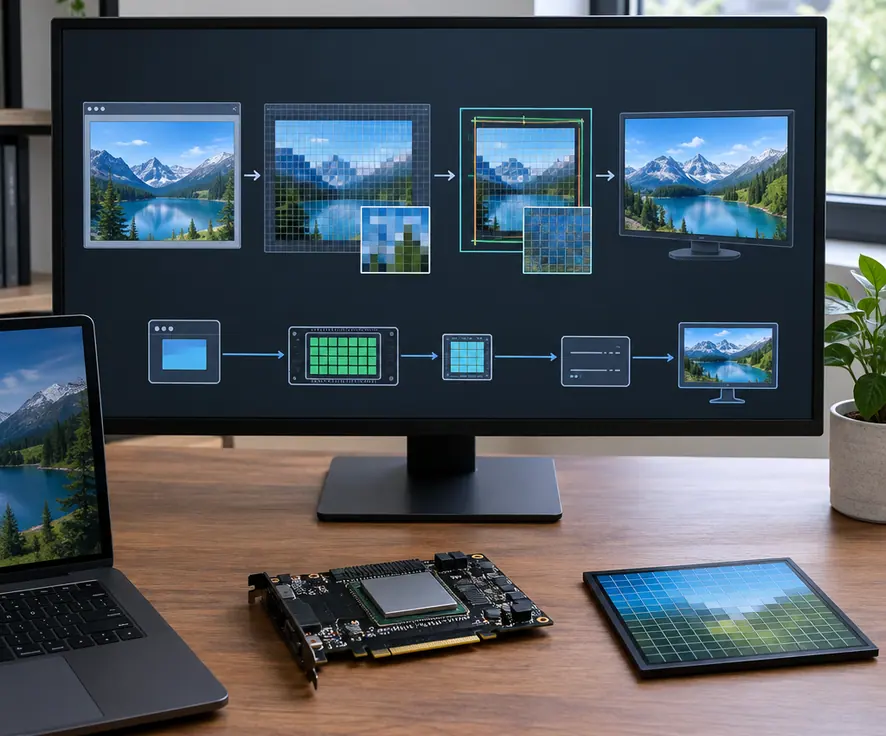
Configuration surfaces across GNOME Mutter (via the scale-monitor-framebuffer flag), KDE Plasma KWin, and wlroots-based compositors like Sway expose this underlying protocol split through different session toggles installed across 2023 and 2024 distribution releases. Regardless of which toggle a user selects in the display settings panel, the compositor places the client's whole-pixel buffer onto a physical grid that diverges from the logical geometry, turning any leftover fraction into a sampling filter rather than a subpixel font hint.
Dragging a Surface Across Mixed Pixel Pitches
Evaluating how per-output scale negotiation behaves in real time requires observing a physical dual-head desk rather than synthetic benchmarks. Consider a common workstation pairing a high-density laptop panel beside a standard-density external monitor, controlled by one pointer dragging a terminal window across the shared bezel.
Wayland assigns scale factors per output, and a single wl_surface tracks its physical location by listening to wl_surface.enter and wl_surface.leave events emitted by the compositor. Because a window is backed by a single unified buffer at any given frame, a surface straddling both monitors cannot hold a buffer dimension that matches both physical pixel pitches simultaneously.
When a single wl_surface overlaps two outputs at the same time, the compositor assigns the preferred_scale of whichever output currently holds the larger surface area or primary ownership, forcing the secondary output to filter the incoming buffer. As a user drags a window across a monitor boundary, the surface visibly shifts from native pixel alignment on the first panel to a compositor-scaled texture on the second before snapping to its new buffer allocation.
In daily use, this handoff produces an immediate visual artifact. Text that appears razor-sharp on the dense laptop panel turns noticeably soft on the external monitor while straddling the seam, or the window noticeably jumps in logical size the instant its center mass crosses the bezel and triggers a toolkit re-allocation.
Why Oversized Buffers Destroy Glyph Stem Hinting
The Supersampling VRAM Trap
Under the ceiling-integer fallback path, the client allocates an offscreen buffer at the next whole integer step and relies on the compositor's OpenGL or Vulkan renderer to downsample the texture on every frame redraw. Video memory consumption scales with the total area of that ceiling-integer buffer, not the smaller fractional dimension selected in the display settings UI.
Inspecting how toolkits commit text to a wl_buffer reveals why downsampling ruins typography. Inside the client process, FreeType executes stem darkening, grid fitting, and subpixel alignment before the completed bitmap ever reaches the compositor. Once those glyphs are baked into the client buffer, their vertical and horizontal stems are locked to that buffer's specific pixel grid. A subsequent linear or lanczos filter in the compositor's scenegraph blends adjacent pixels together, destroying the high-contrast edges that the font rasterizer calculated.
This mechanism separates modern native applications from legacy containers and web tools:
- Native Wayland Toolkits (GTK4 and Qt6): These clients read the
wp_fractional_scale_v1event, compute a target buffer size usingwp_viewport.set_destination, and rasterize fonts directly at the target pixel count. They avoid the ceiling-integer memory penalty on a single monitor, though they still suffer from compositor filtering when straddling mixed-DPI bezels. - Rootless XWayland Clients: XWayland surfaces lack per-surface fractional viewport negotiation by default, handing over an integer-rasterized bitmap that the compositor must stretch or shrink across the target output's physical grid.
One technical exception applies to non-text workloads: applications rendered entirely with resolution-independent vector shaders or 3D viewports that bypass bitmap font caches do not suffer from stem-hinting destruction during the compositor downsample pass. For code editors, browsers, and terminal emulators, however, the rasterization boundary remains the decisive bottleneck.
Locking Integer Scales and Tuning Session Typography
Early attempts to eliminate XWayland blur by toggling experimental compositor flags that force X11 clients to scale themselves were discarded after legacy toolkits produced broken click targets and clipped UI chrome across mixed-DPI boundaries. Locking each physical monitor to its nearest whole integer scale and shifting layout compensation into toolkit-level font and interface settings resolves both the memory overhead and the sampling blur.
- Assign Native Integer Output Scales: Open the compositor's display configuration and set the standard-density external monitor to an integer factor of 1 and the high-density laptop panel to an integer factor of 2 (or 1 if the physical panel pitch permits readable native text).
- Shift Scaling to the Font Rasterizer: Instead of stretching framebuffers, adjust the desktop environment's text-scaling factor or force a custom font DPI within the toolkit settings. FreeType will generate larger glyph bitmaps aligned directly to the hardware pixel grid without allocating oversized offscreen surfaces.
- Resize Chrome Independently: Adjust status panel heights, cursor sizes, and default window geometries inside the desktop session preferences to match the physical viewing distance of each screen.
- Pin Legacy X11 Workloads: Keep XWayland-bound applications on an integer-scaled output whenever text clarity is critical. If an X11 application must reside on a fractionally transformed output, recognize that the resulting softness comes from the compositor's viewport filter rather than a missing font package or broken hinting configuration.
Live Bezel Drag Verification
Verifying subpixel sharpness requires inspecting body text at 9-point to 11-point sizes while dragging a live window across the monitor boundary, as static settings thumbnails do not execute the cross-output
wp_viewporthandoff. Reconfiguring a session from fractional output scaling to integer per-output scaling plus a custom text-scaling factor through standard desktop settings panels takes effect without restarting the display server.
Beneath every desktop slider and toolkit abstraction, the entire fractional-scale wire protocol hinges on a fixed integer denominator of 120—proof that even when Wayland negotiates fractional layouts, the graphics pipeline only ever speaks in whole numbers.