The Image-Based Turn That Decides Where Full-Stack Tools Live
Fedora Silverblue ships the workstation as a versioned image. Updates arrive as a new deployment you boot, while the previous deployment stays on disk until you prune it. OSTree retains the active deployment (index 0) and the previous rollback deployment (index 1) by default under /ostree/deploy/fedora/deploy/, whilst mounting /usr as a read-only filesystem. That architecture turns full-stack workstation provisioning into a placement problem.
Three distinct surfaces handle the workload on an image-based desktop, and each serves a non-overlapping role:
- Host layers via rpm-ostree: Reserved strictly for software that must join the booted image and bind to early kernel or system targets.
- Toolbx containers: Dedicated to compilers, language runtimes, C headers, and project toolchains.
- Flatpak: Built for web tools, browsers, code editors, and other user-space GUI applications across desktop environments.
When I first provisioned a Silverblue workstation, I treated rpm-ostree as a drop-in replacement for dnf by layering gcc, nodejs, and postgresql-server directly onto the base image. That shortcut held until the first semiannual release rebase failed due to libpq and openssl version dependency conflicts against the new base tree. Refactoring the setup into the strict three-tier placement model eliminated those upgrade blocks permanently. Transitioning a legacy workstation mindset to this three-surface placement model takes approximately 2 to 4 days of active workflow adjustment, primarily spent redirecting IDE build paths away from host binaries.
Workstation Surface Boundaries
Scope this three-part split—rpm-ostree for hardware and boot daemons, Toolbx for CLI toolchains, and Flatpak for GUI binaries—specifically to a Fedora Silverblue developer workstation. Production container hosts and alternative immutable spins enforce different state models.
| Component Category | Target Surface | Management Command | Storage & Persistence Path | Rebase Survival Behavior |
|---|---|---|---|---|
| Kernel modules, libvirt, host VPNs | Host OS Layer | rpm-ostree install <pkg> | /ostree/deploy/fedora/deploy/ | Re-applied and re-solved against the new base tree during rebase |
| Node, Python, Go, C headers, CLIs | Toolbx Container | toolbox create -c <name> | ~/.local/share/containers/storage | Untouched by host OS rebase; persists independently in user storage |
| Code editors, browsers, GUI clients | Flatpak Sandbox | flatpak install flathub <app> | /var/lib/flatpak or ~/.local/share/flatpak | Decoupled from base OS; updates against independent Flatpak runtimes |
Layer Only the Packages the Booted Image Must Own
Host package installation on Silverblue operates as a staged deployment rather than a live mutation of the running root filesystem. You inspect the current tree, queue the required system packages, reboot into the newly synthesized image, and verify the booted state:
- Check the active deployment state with rpm-ostree status.
- Stage the host-bound packages using rpm-ostree install libvirt tailscale.
- Execute systemctl reboot to switch into the new deployment index.
- Run rpm-ostree status again after logging in to confirm the layered packages appear under the active ● deployment marker.
Keep the host layer list brutally short. When evaluating whether virtualization services like libvirt and a mesh VPN daemon belonged in rootless containers or on the host, device node and kernel module requirements settled the question. Because both services needed direct access to /dev/kvm, /dev/net/tun, and early boot systemd targets before a user session begins, they earned a spot on the host layer list. Hardware enablement drivers that cannot run inside a container belong here as well. Never layer Node, Python, Go, a JDK, or database servers onto the host image.
Every rpm-ostree install invocation downloads RPMs, resolves dependencies against the base ostree commit, and synthesizes a new root filesystem tree, adding in the range of 45 to 120 seconds of local transaction processing per update. When 12 or more development packages are layered onto the host, local deployment composition times regularly extend to just about 4 to 7 minutes and risk dependency solver deadlocks during major version rebases. Note that the rpm-ostree layering mechanics and GNOME-centric portal defaults described here apply to standard Fedora Silverblue workstation images; Fedora CoreOS and bootc-based server images enforce declarative Ignition or Containerfile builds where interactive local layering is disabled or treated as an anti-pattern.
Verify Layers Post-Reboot
Judge a host layer only after the machine reboots. A staged deployment that has not been booted is just an inactive filesystem tree sitting on disk, and none of its binaries or systemd units exist in the system you are currently running.
Give Node, Python, and Go Separate Toolbx Containers
Dumping every compiler and language runtime into a single default container recreates traditional package manager conflicts inside a slightly smaller box. In practice, consolidating all language toolchains into one shared Toolbx container breaks down the moment a legacy project requires Python 3.10 and OpenSSL 1.1 headers while a newer service demands Python 3.12 and OpenSSL 3.0. Splitting the environment into dedicated per-stack containers eliminates header collisions without giving up shared access to your source code.
Build the create-and-enter loop around named containers instead of a shared junk drawer:
- Create isolated environments per runtime: toolbox create -c node-stack, toolbox create -c python-stack, and toolbox create -c go-stack.
- Enter the target environment with toolbox enter -c node-stack.
- Install that specific toolchain using the container's native package manager, such as sudo dnf install nodejs npm gcc-c++ make.
Instantiating a named container via toolbox create -c pulls the fedora-toolbox OCI image (roughly 350 MB to 500 MB compressed) once, while subsequent containers share the underlying Podman overlay storage under ~/.local/share/containers/storage.
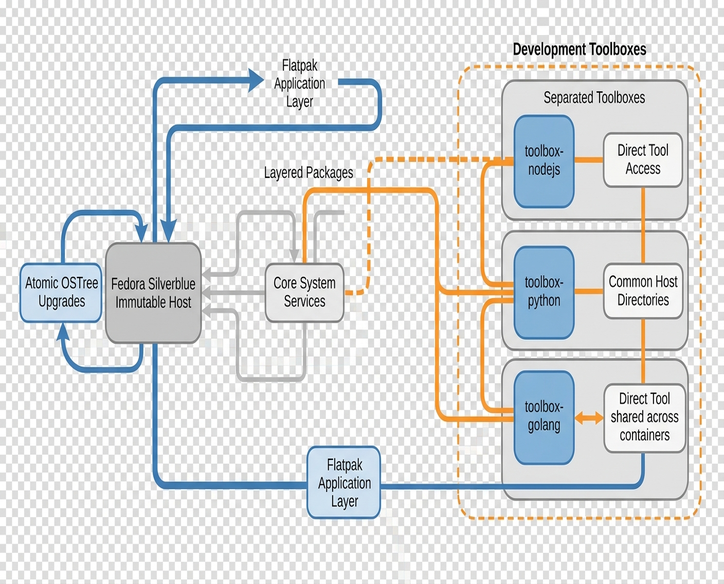
Understanding what this boundary actually isolates is critical for privacy & security. Each Toolbx container maintains its own mutable /usr and /etc directories, ensuring that C headers, global npm modules, and language binaries never touch the read-only host image. At the same time, Toolbx bind-mounts the user's host $HOME, /run/user/$UID, and /tmp directly into the container namespace. Your source trees, .gitconfig, and SSH keys are the exact same files you interact with on the host. Because of that shared home mount, Toolbx acts strictly as an OS-image packaging boundary rather than a confidential security boundary around secrets sitting in ~/.ssh or ~/.aws.
For a complete full-stack workflow, assign one container per language—or one per repository when strict version pins conflict. Run PostgreSQL, Redis, or MariaDB inside standard rootless Podman containers with published ports rather than installing database servers inside Toolbx or layering them onto the host. A simple shell alias or directory-level helper script in ~/.bashrc can then drop your terminal straight into the matching container whenever you navigate into a project folder.
Keep the Editor and Browser in Flatpak, Off the Image
Graphical user-space applications belong in Flatpak. Pinning a fast-moving web browser or IDE to the base OS via rpm-ostree forces deployment rebuilds for routine browser patches and ties application lifecycles to your kernel tree. Flatpak applications update against independent runtimes without rebuilding the host deployment.
- Enable the repository: flatpak remote-add --if-not-exists flathub https://dl.flathub.org/repo/flathub.flatpakrepo.
- Install your browser and editor: flatpak install flathub org.mozilla.firefox com.visualstudio.code.
Flatpak introduced a sandboxed runtime model for desktop applications distributed separately from host RPM packages. Running a code editor inside a Flatpak initially prevents its integrated terminal from seeing compilers installed inside your node-stack Toolbx because the Flatpak sandbox replaces /usr with its own org.freedesktop.Platform runtime. Host integration that a full-stack editor expects—device access, nested container sockets, and arbitrary filesystem paths—is shaped by portal permissions.
Work through the permission boundary deliberately rather than disabling the sandbox. When a Flatpak editor opens a repository under your home directory, grant access strictly to your workspace directory instead of exposing the entire disk. Scoping access via flatpak override --user --filesystem=~/projects com.visualstudio.code restricts the sandbox mount table to the target directory tree rather than exposing ~/.ssh or ~/.gnupg via --filesystem=home. Re-check these overrides after major application updates, as portal behavior is evaluated per application.
To bridge the editor's integrated terminal into your Toolbx stacks, configure the IDE to invoke flatpak-spawn --host toolbox run -c node-stack bash (or a host-spawn wrapper) as its default shell profile. Auditing permissions and configuring host-spawn wrappers for a new Flatpak IDE adds time to each workstation setup. Whenever a build task demands direct hardware pass-through or complex socket chaining that fights the desktop sandbox, run that task directly from a host terminal attached to Toolbx rather than forcing it through the GUI sandbox.
Provision in an Order the Next Rebase Will Not Undo
Provisioning sequence matters on an immutable workstation. In early deployments, cloning project repositories and running npm or cargo build hooks before creating Toolbx containers caused wrapper scripts to fall back to missing host binaries and cache broken paths in local dotenv files. Reordering the setup sequence so that host layers, Flatpaks, and Toolbx stacks exist before any git clone occurs ensures that initial build hooks resolve against the container /usr tree from the first run.
Follow this exact day-one sequence on a fresh machine:
- Verify the base deployment: Run rpm-ostree status to confirm the clean starting commit.
- Layer host-bound packages and reboot: Install only hardware, virtualization, or host-networking daemons via rpm-ostree install, then immediately reboot into the new deployment.
- Install Flatpak GUI apps: Pull browsers, editors, and database viewers from Flathub and apply scoped filesystem overrides for ~/projects.
- Create named Toolbx containers from manifests: Spin up node-stack, python-stack, and go-stack, then populate each from a tracked text file of package names.
- Clone project repositories: Pull your Git trees into ~/projects last, ensuring the bind-mounted directories immediately see the configured container toolchains.
Upstream Fedora Silverblue documentation outlines the underlying image lifecycle: Flatpaks and Toolbx containers live outside the ostree image in user or system var storage, so they survive OS updates intact as long as their storage partitions are not wiped. Executing a full major-version OS rebase with rpm-ostree rebase fedora:fedora/<version>/x86_64/silverblue runs in the background while existing Toolbx and Flatpak runtimes continue running uninterrupted. Only your short list of host layers requires verification after a major rebase.
Maintain four non-negotiable habits across your distribution reviews and daily workstation maintenance: keep a single tracked file for your host layer list, maintain one plain-text package manifest per Toolbx stack, log your Flatpak installation IDs and permission overrides in version control, and keep all language runtimes off the host image. Rebuilding a corrupt or deleted Toolbx container from a tracked plaintext package manifest using dnf install -y $(cat node-packages.txt) turns a wiped environment into a routine package installation rather than a memory test.
A Broken Layer Is Still Sitting in the Boot Menu
The entire discipline of separating host layers, Toolbx stacks, and Flatpaks rests on one core architectural mechanism: rpm-ostree never overwrites the running system in place. Every package layer or release rebase compiles a separate deployment directory on disk, leaving the exact deployment you were just running selectable in the boot menu until you explicitly prune it.
Keeping the host list minimal, scripting Toolbx manifests, and isolating GUI apps in Flatpak are how you keep the next deployment boring. Yet even when a third-party kernel module layered via akmods fails to compile against a newly rebased kernel tree and drops the boot sequence into an emergency shell, you never need to hunt for a live-USB drive or build a chroot recovery environment.
Selecting index 1 in the GRUB boot menu boots the previous working OSTree deployment without external rescue media. Running rpm-ostree rollback followed by a reboot makes that rollback permanent.